GraphQL Query Rate Limiting
Overview
This policy is an example of how to implement rate limiting for GraphQL queries using the Classifier.
Configuration
This policy is based on the
Rate Limiting blueprint. It
contains a Classifier that extracts the userID claim from
a JWT token in the request's authorization header and then rate limit unique
users based on the extracted user_id Flow Label;
todo-service.prod.svc.cluster.local is selected as the target service for
this policy.
Classification rules can be written based on HTTP requests, and scheduler priorities can be defined based on Flow Labels by live previewing them first using introspection APIs.
The below values.yaml file can be generated by following the steps in the
Installation section.
- aperturectl values.yaml
# yaml-language-server: $schema=../../../../../../blueprints/rate-limiting/base/gen/definitions.json
blueprint: rate-limiting/base
uri: ../../../../../../../blueprints
policy:
  policy_name: "graphql-rate-limiting"
  rate_limiter:
    bucket_capacity: 40
    fill_amount: 2
    selectors:
      - control_point: ingress
        service: todo-service.svc.cluster.local
    parameters:
      limit_by_label_key: user_id
      interval: 1s
  resources:
    flow_control:
      classifiers:
        - selectors:
            - control_point: ingress
              service: todo-service.svc.cluster.local
          rego:
            labels:
              user_id:
                telemetry: true
            module: |
              package graphql_example
              import future.keywords.if
              query_ast := graphql.parse_query(input.parsed_body.query)
              claims := payload if {
                io.jwt.verify_hs256(bearer_token, "secret")
                [_, payload, _] := io.jwt.decode(bearer_token)
              }
              bearer_token := t if {
                v := input.attributes.request.http.headers.authorization
                startswith(v, "Bearer ")
                t := substring(v, count("Bearer "), -1)
              }
              queryIsCreateTodo if {
                some operation
                walk(query_ast, [_, operation])
                operation.Name == "createTodo"
                count(operation.SelectionSet) > 0
                some selection
                walk(operation.SelectionSet, [_, selection])
                selection.Name == "createTodo"
              }
              user_id := u if {
                queryIsCreateTodo
                u := claims.userID
              }
Generated Policy
Circuit Diagram for this policy.
For example, if the mutation query is as follows
mutation createTodo {
  createTodo(input: { text: "todo" }) {
    user {
      id
    }
    text
    done
  }
}
Without diving deep into how Rego works, the source section mentioned in this use-case does the following:
- Parse the query
- Check if the mutation query is
createTodo - Verify the JWT token with a secret key
secret(only for demonstration purposes) - Decode the JWT token and extract the
userIDfrom the claims - Assign the value of
userIDto the exported variableuserIDin Rego source
From there on, the Classifier rule assigns the value of the exported variable
userID in Rego source to user_id flow label, effectively creating a label
user_id:1. This label is used by the
Rate Limiter component in the policy to limit the
createTodo mutation query to 2 requests per second, with a burst capacity of
40 requests for each userID.
Installation
Generate a values file specific to the policy. This can be achieved using the command provided below.
aperturectl blueprints values --name=rate-limiting/base --version=v2.34.0 --output-file=values.yaml
Apply the policy using the aperturectl CLI or kubectl.
- aperturectl (Aperture Cloud)
- aperturectl (self-hosted controller)
- kubectl (self-hosted controller)
aperturectl cloud blueprints apply --values-file=values.yaml
Pass the --kube flag with aperturectl to directly apply the generated policy
on a Kubernetes cluster in the namespace where the Aperture Controller is
installed.
aperturectl blueprints generate --values-file=values.yaml --output-dir=policy-gen
aperturectl apply policy --file=policy-gen/policies/graphql-rate-limiting.yaml --kube
Apply the generated policy YAML (Kubernetes Custom Resource) with kubectl.
aperturectl blueprints generate --values-file=values.yaml --output-dir=policy-gen
kubectl apply -f policy-gen/policies/graphql-rate-limiting-cr.yaml -n aperture-controller
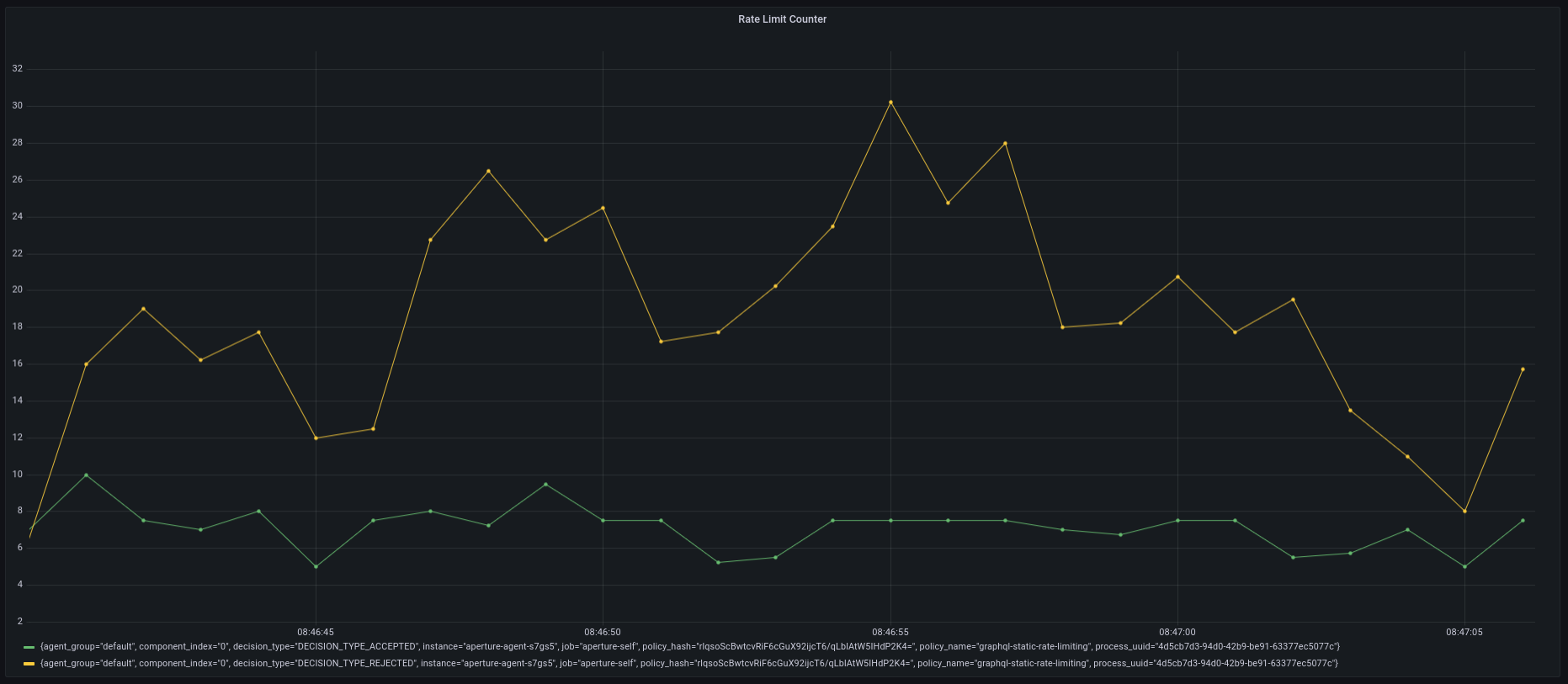
Policy in Action
In this example, the traffic generator is configured to generate 50 requests
per second for 2-minutes. When loading the above policy in the playground, you
can observe that it accepts no more than 2 requests per second at any given
time, and rejects the rest of the requests.